
🚀 Data Modeling With PostgresSQL
Overview
In this project, we create data modeling with postgres and build ETL pipeline using python. Study Case : A startup in indonesia wants to analyze the data they have been collecting on songs and user activity on their new music streaming app. Currently, this startup collecting data in json format and the analytics team is particularly interested in understanding what songs user are listening to.
Song Dataset
Songs dataset is a subset of [Million song dataset]((http://millionsongdataset.com/)
Sample record:
{"num_songs": 1, "artist_id": "ARJIE2Y1187B994AB7", "artist_latitude": null, "artist_longitude": null, "artist_location": "", "artist_name": "Line Renaud", "song_id": "SOUPIRU12A6D4FA1E1", "title": "Der Kleine Dompfaff", "duration": 152.92036, "year": 0}Log Dataset
Logs dataset is generated by Event Simulator
Sample Record :
{"artist": null, "auth": "Logged In", "firstName": "Walter", "gender": "M", "itemInSession": 0, "lastName": "Frye", "length": null, "level": "free", "location": "San Francisco-Oakland-Hayward, CA", "method": "GET","page": "Home", "registration": 1540919166796.0, "sessionId": 38, "song": null, "status": 200, "ts": 1541105830796, "userAgent": "\"Mozilla\/5.0 (Macintosh; Intel Mac OS X 10_9_4) AppleWebKit\/537.36 (KHTML, like Gecko) Chrome\/36.0.1985.143 Safari\/537.36\"", "userId": "39"}Schema
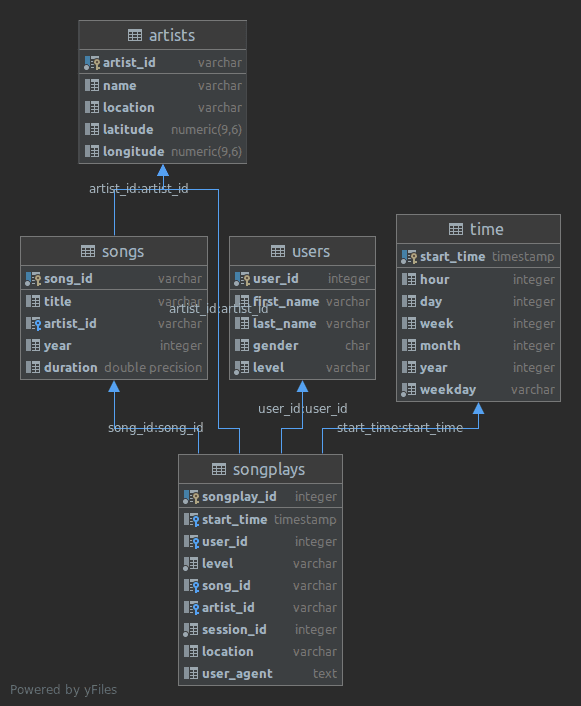
Fact Table
songplays - records in log data associated with song plays i.e. records with page NextSong
songplay_id, start_time, user_id, level, song_id, artist_id, session_id, location, user_agentDimension Tables
users - users in the app
user_id, first_name, last_name, gender, levelsongs - songs in music database
song_id, title, artist_id, year, durationartists - artists in music database
artist_id, name, location, latitude, longitudetime - timestamps of records in songplays broken down into specific units
start_time, hour, day, week, month, year, weekdayProject Files
sql_queries.py -> contains sql queries for dropping and creating fact and dimension tables. Also, contains insertion query template.
create_tables.py -> contains code for setting up database. Running this file creates sparkifydb and also creates the fact and dimension tables.
etl.ipynb -> a jupyter notebook to analyse dataset before loading.
etl.py -> read and process song_data and log_data
test.ipynb -> a notebook to connect to postgres db and validate the data loaded.
Environment
Python 3.6 or above
PostgresSQL 9.5 or above
psycopg2 - PostgreSQL database adapter for Python
How to run
Run the drive program main.py as below.
python main.pyThe create_tables.py and etl.py file can also be run independently as below:
python create_tables.py
python etl.py
Source